
SlideDocs By Nancy Duarte – Immediate Download!
Let see the contents included in this course
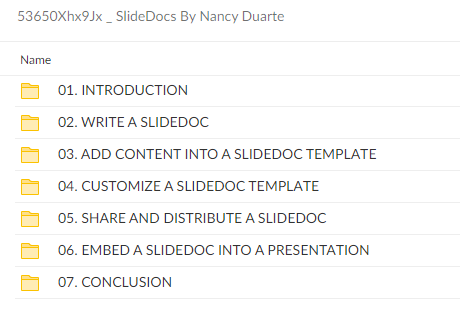
SlideDocs By Nancy Duarte
Overview

Course Syllabus
Course introduction
Section 1, Course Materials – Download these files to reference and use throughout the course
- Writing Tips for Slidedocs
Section 2, Write a Slidedocâ„¢
- Writing for a Slidedocâ„¢
- Start with your reader’s needs
- Try: Analyze your reader’s content preferences
- Exercise 1: Reader Analysis
- What’s your Big Ideaâ„¢?
- Try: Write your Big Ideaâ„¢
- Exercise 2: Develop Your Big Idea
- Identify your main points
- Outline your content
- Block your content
- Communicate one idea per slide
- How to write clear slide titles
- Try: Write slide titles as insights
- Exercise 3: Write Slide Titles as Insights
- Utilize story structure
- Invite others to collaborate
- Try: Outline or block your content
- Write your slide content
- How to write skimmable copy
- The anatomy of a Slidedocâ„¢
- Write an introduction and/or a summary
- Practice brevity
- Slidedocâ„¢ writing tips
- Try: Fill in supporting content for your slides
Section 3, Add content into a Slidedocâ„¢ template
- Using a Slidedocâ„¢ template
- Slidedocâ„¢ template features: Part 1
- Slidedocâ„¢ template features: Part 2
- Add your content to a Slidedocâ„¢ template
- How to bring your content into a Slidedocâ„¢ template
- How to edit and format your content
- Try: Transfer your content to a Slidedocâ„¢ template
- How to adjust elements in a Slidedocâ„¢
- Try: Add non-text elements to your Slidedocâ„¢
Section 4, Customize a Slidedocâ„¢ template
- Customizing a Slidedocâ„¢ template to match your brand
- Prepare to customize a Slidedocâ„¢ template
- How to change the default template colors
- Try: Update your Slidedocâ„¢’s default colors
- How to change Slidedocâ„¢ template backgrounds
- Try: Change the backgrounds in your Slidedocâ„¢
- How to add a logo to your Slidedocâ„¢
- Try: Add a logo to your Slidedocâ„¢
- How to make additional changes to the Slide Master
- Try: Adjust elements in your Slide Master
- How to change Slidedocâ„¢ template fonts
- Try: Change the fonts in your Slidedocâ„¢
- How to update icons and images in your Slidedocâ„¢
- Try: Insert branded elements in your Slidedocâ„¢
- Slidedocâ„¢ case study: Roger Sant
Section 5, Share and distribute a Slidedocâ„¢
- Preparing your Slidedocâ„¢ for distribution
- When to print your Slidedocâ„¢
- When to project your Slidedocâ„¢
- When to post your Slidedocâ„¢ online
- How to send your Slidedocâ„¢
- Try: Decide how to distribute your Slidedocâ„¢
- Slidedocâ„¢ case study: Tacoma Power
Section 6, Embed a Slidedocâ„¢ into a presentation
- Embedding a Slidedocâ„¢ into a presentation
- How to modify the Notes Master to create a Slidedocâ„¢
- Try: Modify a presentation Notes Master
Section 7, Final thoughts
- Slidedocâ„¢ recap
- Convince your audience even if you’re not present by fusing compelling language with images.
- Create visually attractive leave-behinds that adequately express your message by adapting live presentation slides.
- Even if you’re not a designer, create reading experiences that resemble magazines.
- Access templates that you may alter to fit the style and feel of your business.
You need your coworkers or customers to support your fantastic concept. However, your strategy is too intricate for an email, and you are aware that very few people would read a lengthy report. How do you pique someone’s interest and convince them when you’re not physically present in the room in this fast-paced world when attention spans are getting shorter?
Slidedocs® are visually appealing documents that are easy to skim and effectively communicate your key points. They are perfect for preparing leave-behinds or pre-reads for your most significant meetings. Additionally, well-executed Slidedocs® can serve as the catalyst for your ideas to catch on like wildfire.
Frequently Asked Questions:
Innovation in Business Models: We use a group purchase approach that enables users to split expenses and get discounted access to well-liked courses. Despite worries regarding distribution strategies from content creators, this strategy helps people with low incomes.
Legal Aspects to Take into Account: Our operations’ legality entails several intricate considerations. There are no explicit resale restrictions mentioned at the time of purchase, even though we do not have the course developers’ express consent to redistribute their content. This uncertainty gives us the chance to offer reasonably priced instructional materials.
Quality Control: We make certain that every course resource we buy is the exact same as what the authors themselves provide. It’s crucial to realize, nevertheless, that we are not authorized suppliers. Therefore, the following are not included in our offerings: – Live coaching sessions or calls with the course author.
– Entry to groups or portals that are only available to authors.
– Participation in closed forums.
– Straightforward email assistance from the writer or their group.
Our goal is to lower the barrier to education by providing these courses on our own, without the official channels’ premium services. We value your comprehension of our distinct methodology.

The Power of Boldness 2023 By Naveen Jain - MindValley
Unreal Engine for Filmmakers 2023 By Sam Eisenhower
Perfecting Blogging + Perfecting Pinterest Bundle 2023 By Sophia Lee
Voodoo Masters Strategy ELITE By David Starr & Henry Gambell - Simpler Trading
Your First 10000 Followers By Katya Varbanova
The Accelerated MTR Blueprint Masterclass 2023 By Jesse Vasquez
Creative Text Effects in Adobe Photoshop CC By Corey Barker
Premiere Pro Quickstart + Power User Pack By Film Editing Pro 

Reviews
There are no reviews yet.